
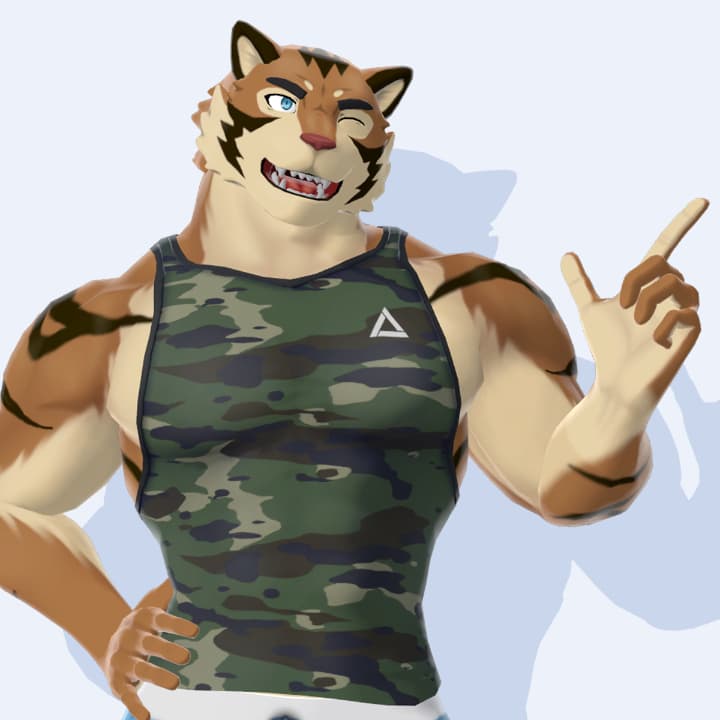
【VRChat】Toraji(KFM-G2) by Kurotori

Included file types
Supported platforms
 VRChat (PCVR)
License & Terms
※Attention: As this is a downloadable product, refunds are not available. Please purchase with the understanding of this policy.
※Disclaimer: The creator assumes no responsibility for any damage, loss, or trouble arising from the use of this data.
Terms of Use:
https://drive.google.com/drive/folders/1JyRDo_XSstPYqx25X0jDn3kt3mOsthS_?usp=sharing
Buy as a gift
Add a custom message along with the exclusive avatar, making it the best gift ever!
Additional Information
This avatar is already set up.
How to upload?
Install "VRChat Creator Companion(VCC)"
Make a new project via VCC
Import VRChatSDK3-Avatars (VRChat SDK for avatars) and lilToon (available at: https://lilxyzw.booth.pm/items/3087170) into your project.
Import the product's Unitypackage.
Click VRChat SDK
Show control panel, and choose "Build"
You can put thumbnail and name, and upload!
Be careful!
Don't upload with "Public" status. Please choose "Private" status to avoid copying by others.
Check your VRC account level! If you are "Visitor" status, you cannot upload your avatar.
Overview
This is a buff Kemono beastman avatar designed for use in VRChat.
It is compatible with the KFM-G2 series body and will accommodate an expanding range of costume parts.
Prerequisite Assets
VRCSDK3-AVATAR
lilToon Shader (https://lilxyzw.booth.pm/items/3087170)
(Additionally) This avatar comes equipped with Dynamic Bone settings that allow for realistic movements of the tail and chest muscles. However, please note that this feature requires the purchase of the following paid Unity Assets.
https://assetstore.unity.com/packages/tools/animation/dynamic-bone-16743
Even without these assets, the avatar can still be used, but it will not have the 'swaying' motion effect."
Specifications
Avatars 3.0 compatible
Full-body tracking ready
Facial expressions setup completed
Includes a setup-ready Unity package
Includes PSD files for texture customization
Includes Blend files for customization
Manual
This avatar is already set up.
How to upload?
Install "VRChat Creator Companion(VCC)"
Make a new project via VCC
Import VRChatSDK3-Avatars (VRChat SDK for avatars) and lilToon (available at: https://lilxyzw.booth.pm/items/3087170) into your project.
Import the product's Unitypackage.
Click VRChat SDK
Show control panel, and choose "Build"
You can put thumbnail and name, and upload!
Be careful!
Don't upload with "Public" status. Please choose "Private" status to avoid copying by others.
Check your VRC account level! If you are "Visitor" status, you cannot upload your avatar.
Update History
[Decemver 12, 2023] Sales began