
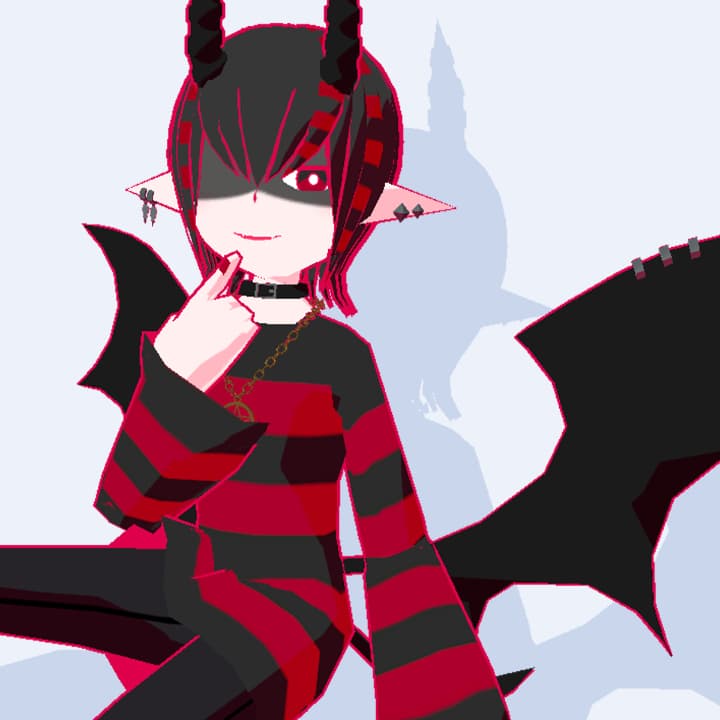
【VRChat/VRM】Gutoe by chemical_15

Included file types
Supported platforms
 VRChat (PCVR)
 VRChat (Quest)
License & Terms
※Attention: As this is a downloadable product, refunds are not available. Please purchase with the understanding of this policy.
※Disclaimer: The creator assumes no responsibility for any damage, loss, or trouble arising from the use of this data.
Terms of Use:
https://drive.google.com/drive/folders/1JyRDo_XSstPYqx25X0jDn3kt3mOsthS_?usp=sharing
Support:
https://discord.gg/9wh44rxa2a
Buy as a gift
Add a custom message along with the exclusive avatar, making it the best gift ever!
Additional Information
This avatar is already set up.
How to upload?
Install "VRChat Creator Companion(VCC)"
Make a new project via VCC
Import VRChatSDK3-Avatars (VRChat SDK for avatars) and lilToon (available at: https://lilxyzw.booth.pm/items/3087170) into your project.
Import the product's Unitypackage.
Click VRChat SDK
Show control panel, and choose "Build"
You can put thumbnail and name, and upload!
Be careful!
Don't upload with "Public" status. Please choose "Private" status to avoid copying by others.
Check your VRC account level! If you are "Visitor" status, you cannot upload your avatar.
Overview
An avatar of a mysterious demon. Includes a MetaQuest compatible VRChat avatar and VRM.
This avatar can be tried on in the VRChat Chemical Avatar World. Visit: [https://vrchat.com/home/world/wrld_7c28bb9f-2a6b-434d-8ad3-c1832b3fa0cf]
Specifications:
Polygon count: 10784
Number of materials: 1
Avatar rank (PC): Excellent, Avatar rank (Quest): Medium
Contents Included:
Gutoe.unitypackage Contains the PC version of the Avatars 3.0 file. Please use in a project with Avatar 3.0 SDK installed.
Gutoe.vrm A VRM file. Please use in compliance with the terms of use.
UV.png An image of the UV layout. Please use for modifications.
Model.fbx A 3D model. Please use for modifications.
Texture folder Contains textures.
Manual
This avatar is already set up.
How to upload?
Install "VRChat Creator Companion(VCC)"
Make a new project via VCC
Import VRChatSDK3-Avatars (VRChat SDK for avatars) and lilToon (available at: https://lilxyzw.booth.pm/items/3087170) into your project.
Import the product's Unitypackage.
Click VRChat SDK
Show control panel, and choose "Build"
You can put thumbnail and name, and upload!
Be careful!
Don't upload with "Public" status. Please choose "Private" status to avoid copying by others.
Check your VRC account level! If you are "Visitor" status, you cannot upload your avatar.
Update History
[Decemver 12, 2023] Sales began